System Architecture Overview
Welcome to the Pontosense Integration test Platform, the central hub for managing sensor devices and integrating them seamlessly into your (the Integrator) systems. The Pontosense platform provides all the tools needed for efficient device management and reliable data flow, offering a full suite of features that enable secure communication between sensor devices and the Integrator’s systems.
1. Overview
The system consists of two primary environments that integrate to deliver real-time monitoring and data access:
-
Pontosense Platform: The core cloud-based system and device infrastructure.
-
Client Platform: The third-party integrator's system and end-user applications.
These platforms communicate through three integration mechanisms:
-
HTTP API (Pull): The Client System actively calls the Pontosense Integration Platform to retrieve data, provision resources, or update configuration.
-
Webhook (Push): The Pontosense Integration Platform automatically pushes Confirmed event notifications to the Client System when they occur.
-
MQTT (Push + Pull): The Pontosense Integration Platform automatically pushes real-time Location Info to the IoT core for client system to pull.
HTTP is used for configuration and data retrieval. Webhook is used for Confirmed event notifications delivery.
Key Terminology
The following terms are used consistently throughout this document:
Sensor: A Silver Shield monitoring device installed in a Room.
Tenant: The account of an organization or customer within the Pontosense Integration Platform.
Client: The third-party integrator's system (Client Platform).
2. High-Level Architecture
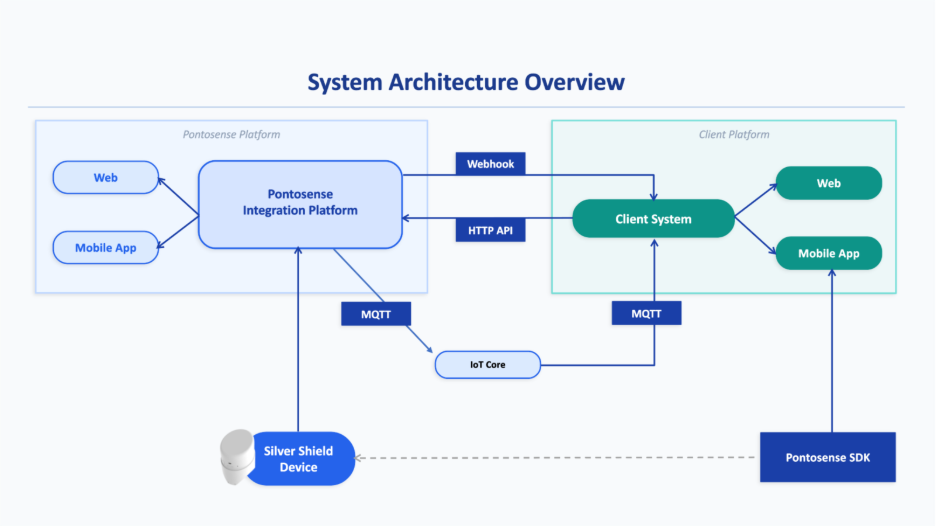
Figure 1 — High-level system architecture diagram
Pontosense Platform
- Pontosense Integration Platform
- Silver Shield Device (Sensor)
- Web
- Mobile App
Client Platform
- Client System
- Web
- Mobile App
- Pontosense SDK (optional)
The Silver Shield Device (Sensor) communicates only with the Pontosense Integration Platform. The Client System integrates with the Pontosense Integration Platform via HTTP API (pull) and Webhook (push).
3. Integration Model
Silver Shield supports two integration mechanisms for connecting the Client System with the Pontosense Integration Platform:
-
Webhook (Push): Confirmed event notifications sent to the Client System as they occur.
-
HTTP API (Pull + Control): Used to retrieve data and manage system configuration.
-
MQTT (Pull + Push): Used to provide real time location coordinates data.
3.1 Webhook (Push — Confirmed event notifications)
The Pontosense Integration Platform automatically delivers event notifications to the Client System as they occur. Webhook is the primary mechanism for alerts, automation, and system synchronization.
| Category | Events Delivered |
|---|---|
| Fall Events | fall_detected, fall_recovered |
| Activity Events | bed_in/out, couch_in/out, door_in/out |
| Occupancy | occupied, vacant |
| Sensor Status | online, offline, malfunctioning, recovered |
| Installation Issues | mount_angle_skewed |
| Firmware Status | upgrade_started, upgrade_succeeded, upgrade_failed |
| Resource Changes | sensor / user / home / room / label / tenant created, updated, deleted, bindings |
| System Events | firmware_published |
| Sensor Raw Config | scan area, firmware version, fall config (sync data) |
Purpose: Alerts, automation, and system synchronization.
3.2 HTTP API (Pull + Control)
The Client System uses the HTTP API to retrieve historical data and manage system configuration on demand.
| Capability | What You Can Retrieve or Control |
|---|---|
| Historical Events | Query past events by time range, type, or sensor |
| Weekly Reports | Retrieve home/room weekly activity summaries |
| Sensor Provisioning | Issue MQTT certificates |
| Sensor Configuration | Scan area, zones, fall delay threshold |
| Sensor Control | Reboot, firmware upgrade, start/stop location reporting |
| Sensor Metadata | Name and custom metadata updates |
| Resource Management | Create, update, and delete Tenants, Homes, Rooms, Users, and Labels |
| Bindings | Assign sensors to rooms, users to homes, labels to homes/users |
| Inventory Queries | Filtered lists of sensors, users, homes, rooms, and labels |
Purpose: Configuration, administration, reporting, and reconciliation.
3.3 MQTT (Push + Pull)
The Integration Platform uses the MQTT to push real time location data for client system to pull.
| Capability | What You Can Retrieve or Control |
|---|---|
| Real Time Location | Target real time coordinates. |
Purpose: Real time location display.
4. System Components
4.1.Definitions
Brief definitions of each component within the Pontosense and Client platforms.
-
Pontosense Integration Platform: Cloud-based core system that processes detection logic, manages device state and Tenant structure, generates Events and Weekly Reports, and exposes the HTTP API and Webhook interfaces.
-
Silver Shield Device (Sensor): Physical radar monitoring device installed in a Room that sends detection data to the Pontosense Integration Platform for processing.
-
Client System: Integrator-owned backend that calls the HTTP API (pull) and receives Webhook Events (push), then distributes data to Client Web and Mobile applications.
-
Web (Pontosense Platform): Native web interface for administration, configuration, and operational workflows within the Pontosense Platform.
-
Mobile App (Pontosense Platform): Native mobile interface for monitoring and operational access within the Pontosense Platform.
-
Web (Client Platform): Integrator-owned web interface powered by the Client System.
-
Mobile App (Client Platform): Integrator-owned mobile interface powered by the Client System.
-
Pontosense SDK (Optional): Android package used in certain deployment models to support device onboarding or embedded hardware-related flows.
Access Control:
All System Management APIs are available to authenticated users, with the exception of the Tenant Management module, which enforces stricter access controls:
-
Requirement: The authenticated user must hold the Distributor identity.
-
Error Handling: Insufficient permissions will result in a standard
403 Forbiddenerror code with appropriate error message.
These APIs allow clients to send requests to the Pontosense service. The API documentation is available in OpenAPI format here: HTTP API Documentation.
4.2. Provisioning SDK and Demo App
Pontosense offers a provisioning SDK and demo application to help developers quickly get started with integrating Pontosense services. The SDK is available for iOS, Android, and Flutter platforms.
- Android Resources
- iOS Resources
4.3. Location Report API
The Location Report system uses MQTT-based JSON-RPC messages to deliver real-time location report directly to your server.
Clients must subscribe to the Pontosense MQTT broker to receive these notifications. Note that this communication is unidirectional; clients cannot publish messages to the MQTT broker. The full API schema and payload definitions are available here: MQTT API Documentation.
5. Core Data Model
The following objects define the logical structure used across the HTTP API and Webhook payloads.
Data Hierarchy Overview
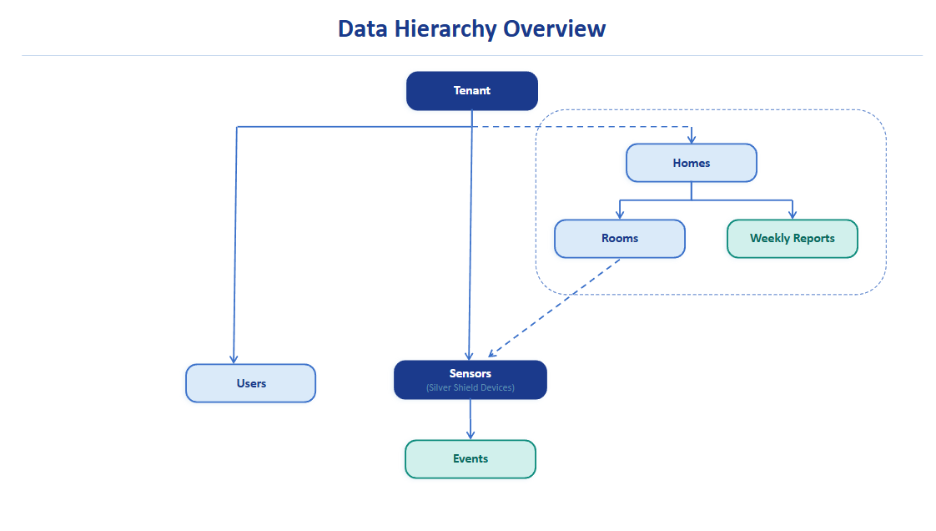
Figure 2 — Core data model hierarchy
Tenant: Top-level organizational boundary within the Pontosense Integration Platform. All data (Users, Homes, Rooms, Sensors, Events, Weekly Reports) is isolated within a Tenant.
Home: A monitored physical location within a Tenant. Homes group Rooms and are the primary unit for alerting and reporting.
Room: A logical monitoring area within a Home (e.g., bedroom, living room). Rooms provide spatial context for detection and contain Sensors.
Sensor (Silver Shield Device): A registered monitoring device assigned to a Room. Sensors send detection data to the Pontosense Integration Platform, which generates Events.
User: An authenticated account within a Tenant with role-based permissions. Users can access Homes and respond to Events based on assigned roles.
Event: A structured, immutable record generated by the Pontosense Integration Platform based on Sensor detections or system activity. Events are timestamped using server canonical time and delivered via Webhook (push) when enabled.
Weekly Report: The Weekly Report is a room-level aggregated summary generated from processed detection and event data over the last 7-day period. A Home ID and Room ID is attached to each Weekly Report.
Reporting Scope (Current Version): Only the following room types are included:
- Bedroom
- Bathroom
Dynamic Content Rules:
- Bedroom insights are generated only if Bedroom-type rooms exist in the home.
- Bathroom insights are generated only if Bathroom-type rooms exist in the home.
- Content adapts to room configuration and data availability – if the above room types are not configured, no insights are produced for that category.
6. Support
For any technical assistance during the integration process, please contact our support team at support@pontosense.com.